

Free AI Note TakerStop Taking Notes.Start Paying Attention.
WebMeet® AI Note Taker is a free AI note taker that helps you capture important details, generate actionable meeting notes and ask AI questions about past conversations, all while keeping your information on your own computer.
No account required. Works with any meeting app.
- Record
- Transcribe
- Summarize
- Ask AI
100% Free, No Subscription, No Account Required, No Meeting Bot.
Coming soon: AI Note Taker for macOS.
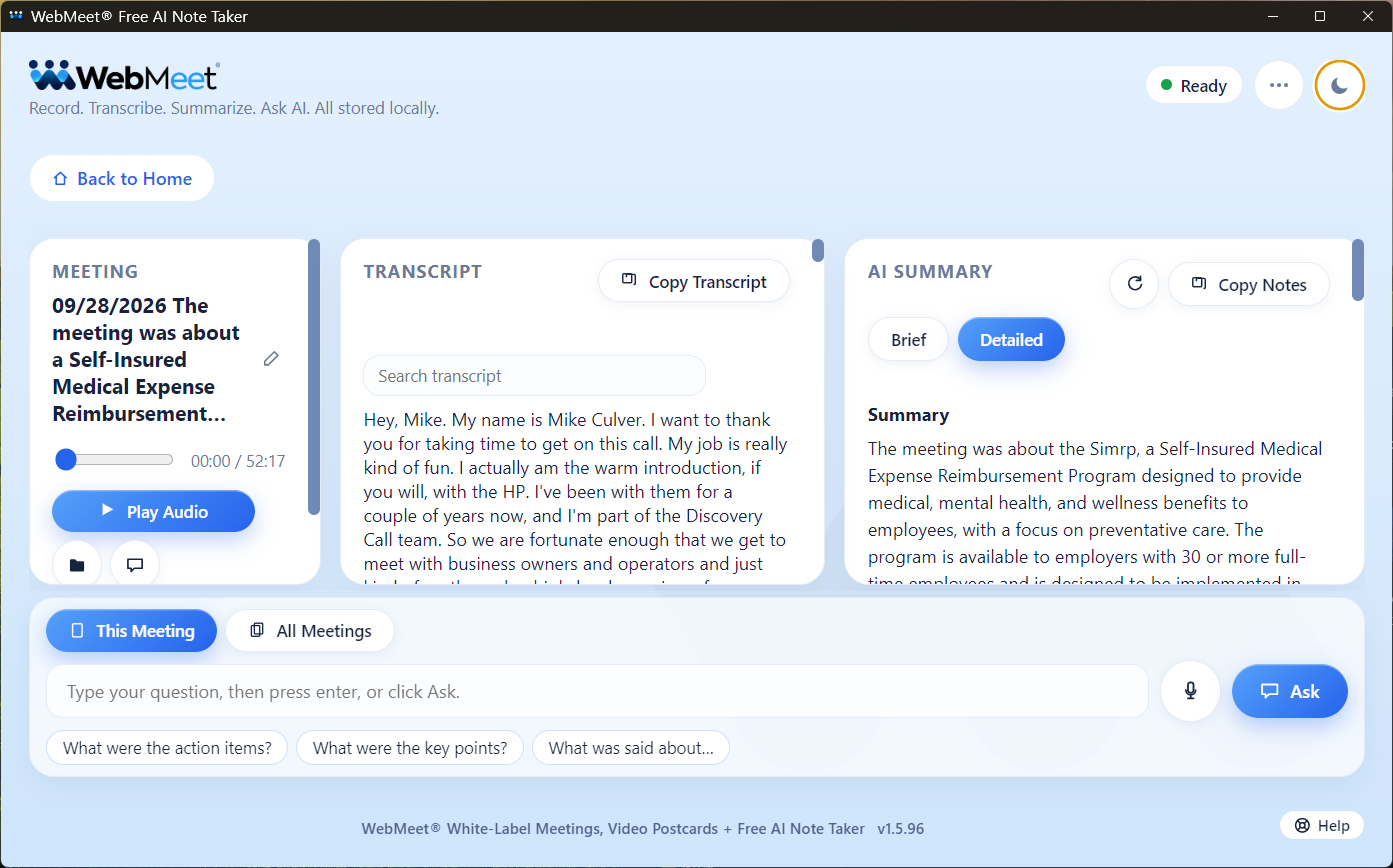
See what the meeting covered
Switch between Brief and Detailed notes, then copy and share.
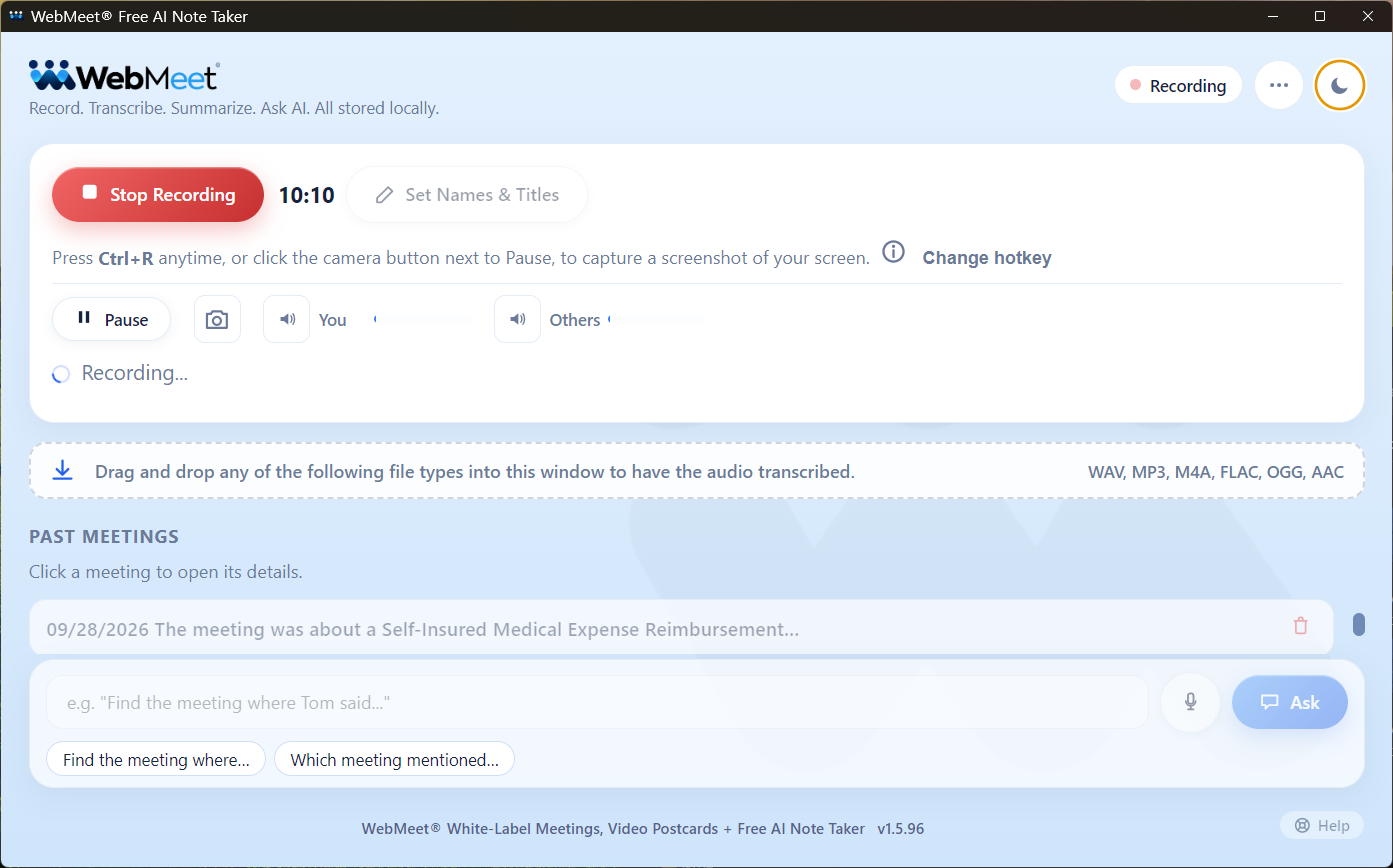
See recording in progress
Pause the recording and capture screenshots during a meeting.
Find the exact words
Search the transcript or copy and paste the conversation.
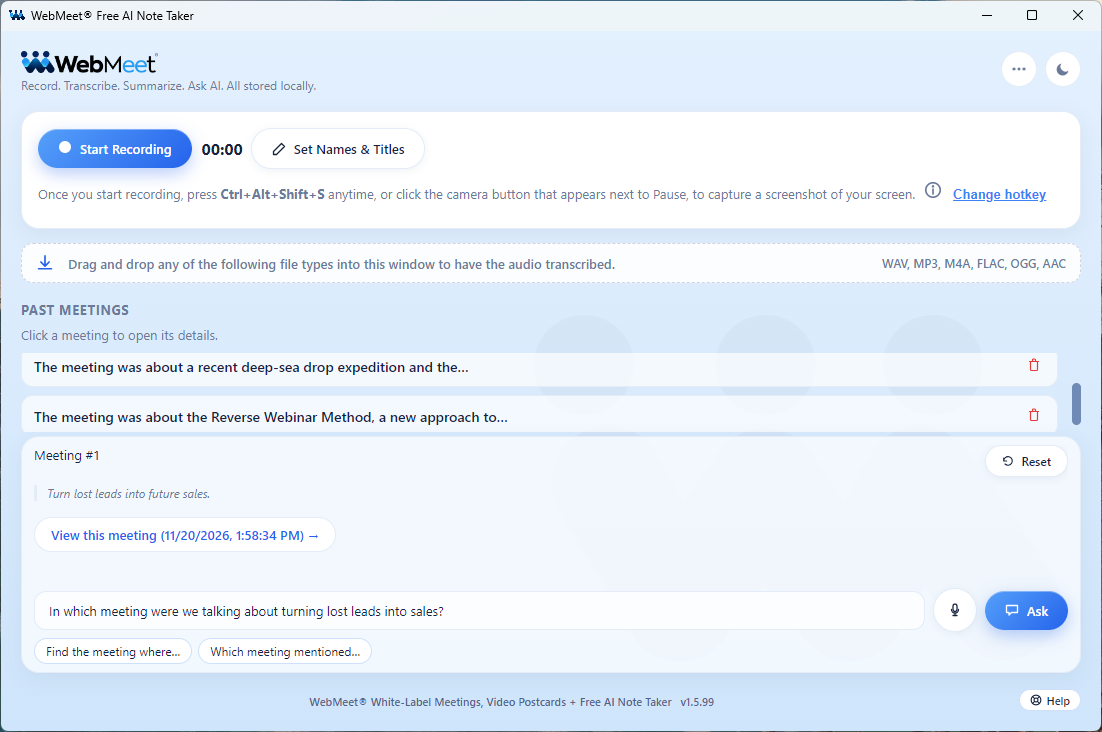
Find a past meeting by asking a question
“In which meeting were we talking about turning lost leads into sales?” Ask AI found a matching excerpt and linked back to the meeting.
More ways to use your AI Note Taker
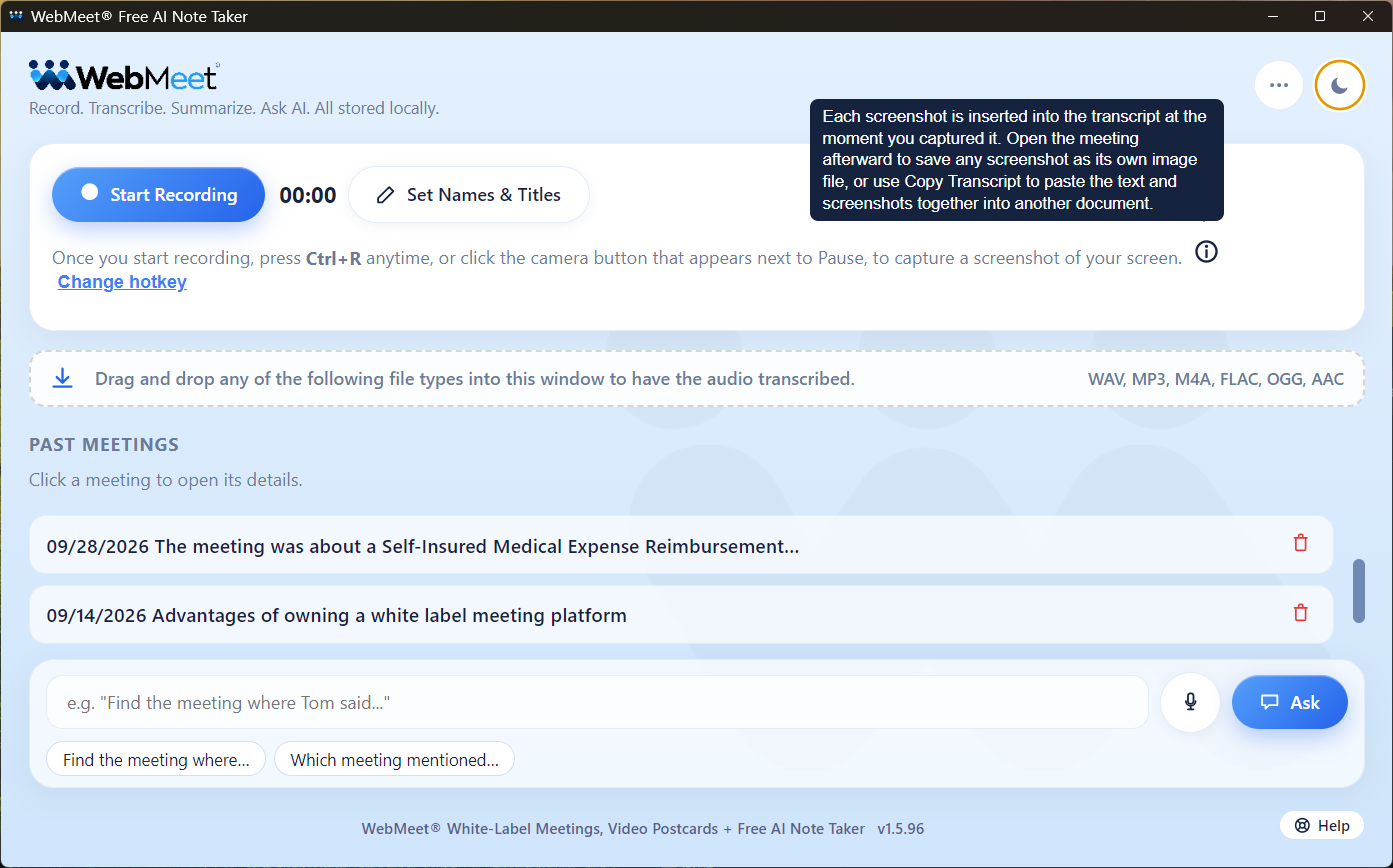
Capture screenshots
Screenshots are inserted into the transcript the moment they were taken.
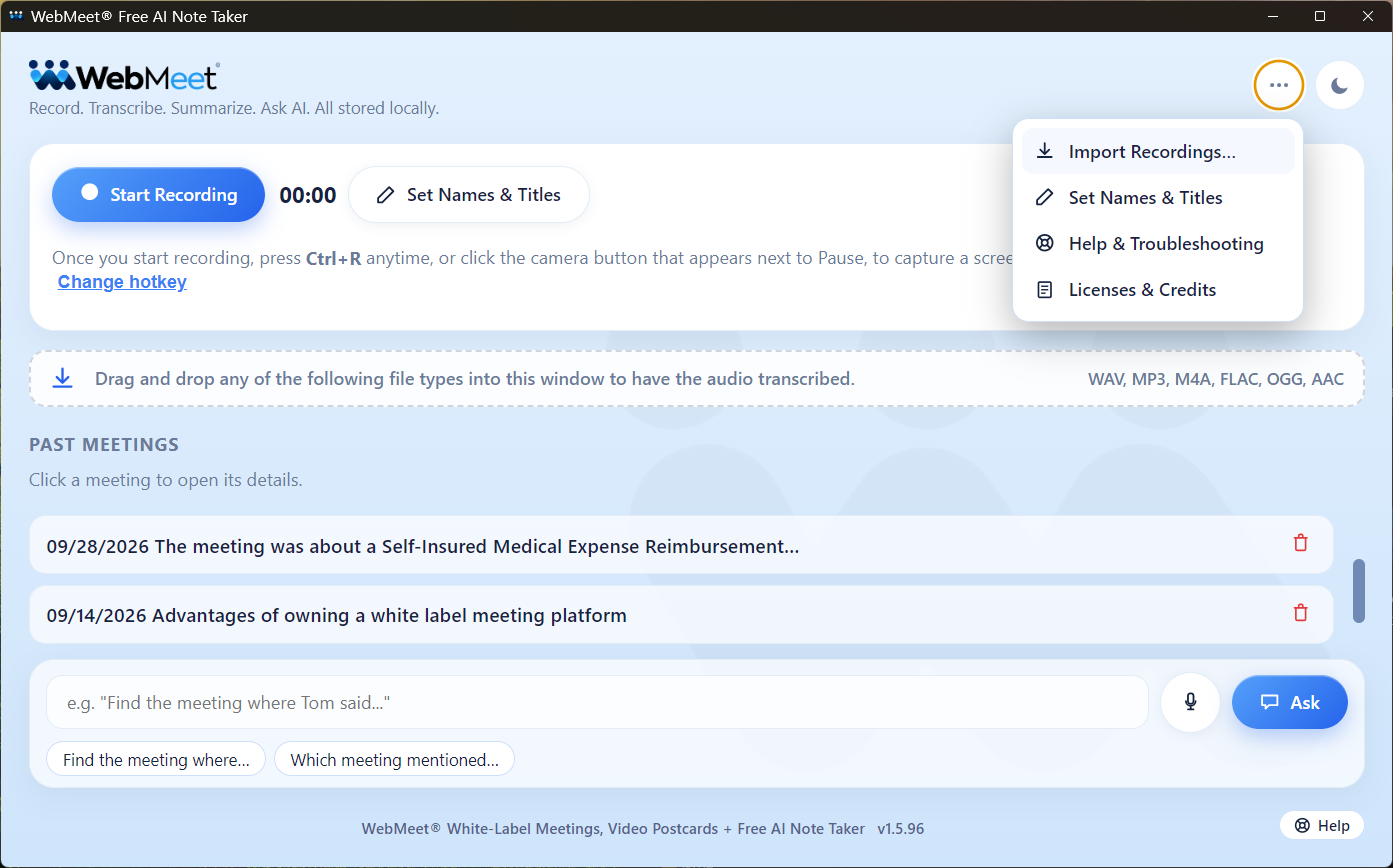
Import an existing recording
Open the menu to import a recording for transcription.
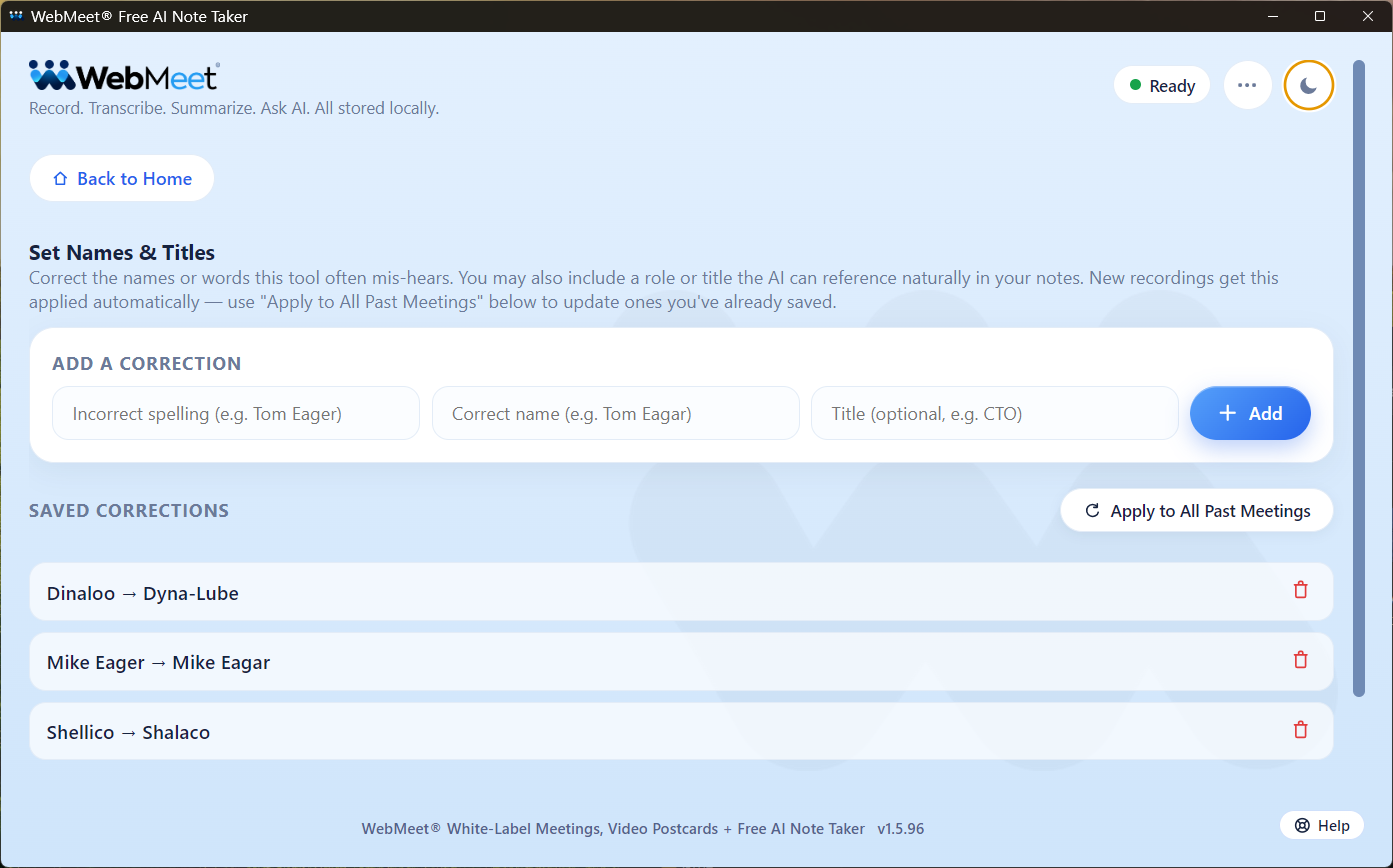
Correct names and titles
Save a correction so the app can recognize the right spelling in future recordings.
BE PRESENT FOR THE CONVERSATION. WE'LL HELP YOU REMEMBER IT.
Stop dividing your attention between the conversation and your notes. WebMeet captures what matters while you focus on the people.
Capture every detail
Record and transcribe meetings.
Get the key points
AI creates summaries and action items.
Find it when you need it
Ask AI about any past conversation.
You focus on the people. WebMeet helps you remember the details.

Three Records
One Meeting. Three Valuable Records. Automatically, With a Free AI Note Taker.
WebMeet is more than a recording application, because this free AI note taker turns your conversations into three valuable resources you can revisit whenever needed.
Audio Recording
Hear exactly what was said.
Keep a recording of your meeting so you can replay important conversations, verify details and revisit the original discussion whenever you need to.
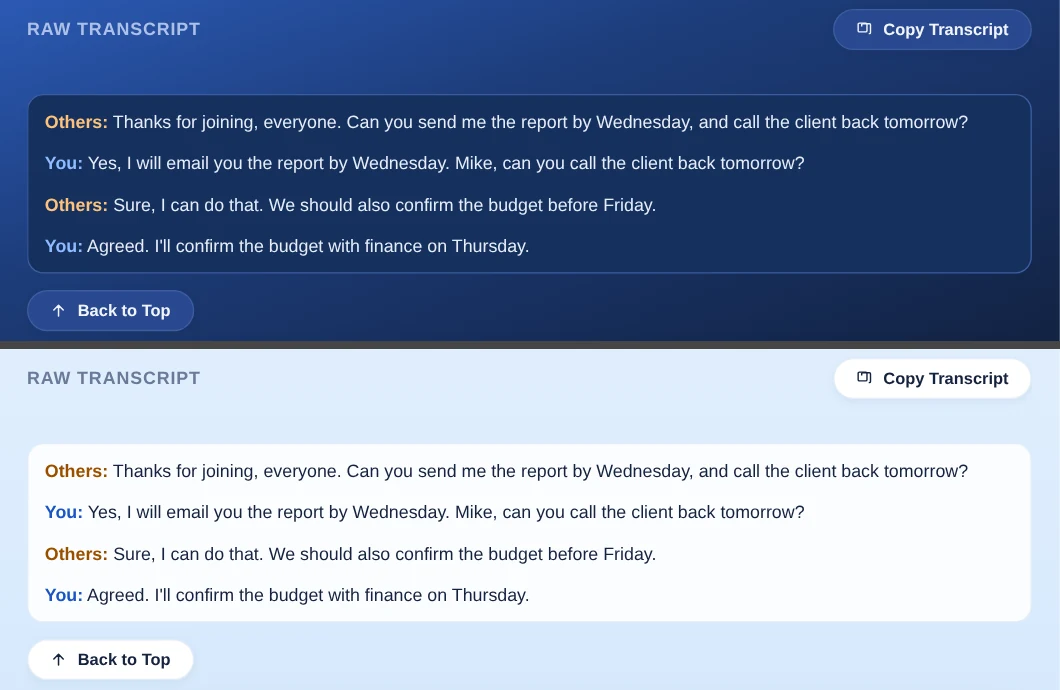
Complete Transcript
Read the conversation instead of replaying the entire meeting.
Get a searchable written record of what was said, so that you can find important details, review discussions and check the original wording without starting the recording over.
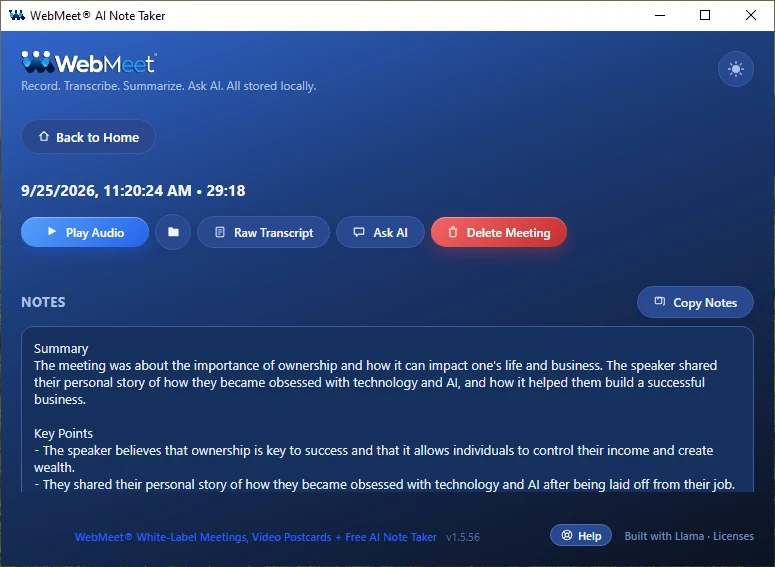
AI Summary & Action Items
Know what happened—and what needs to happen next.
WebMeet automatically organizes your meeting into an easy-to-review summary, key discussion points and action items.
Record it once, keep the details and revisit them anytime.
Ask AI
Ask Your Meetings Anything. Get Answers From Your Free AI Note Taker.
You remember discussing something important. But was it Monday's meeting? Last week's client call? Or a conversation from two months ago?
With WebMeet, however, you don't have to remember which recording contains the answer.
Simply ask AI.
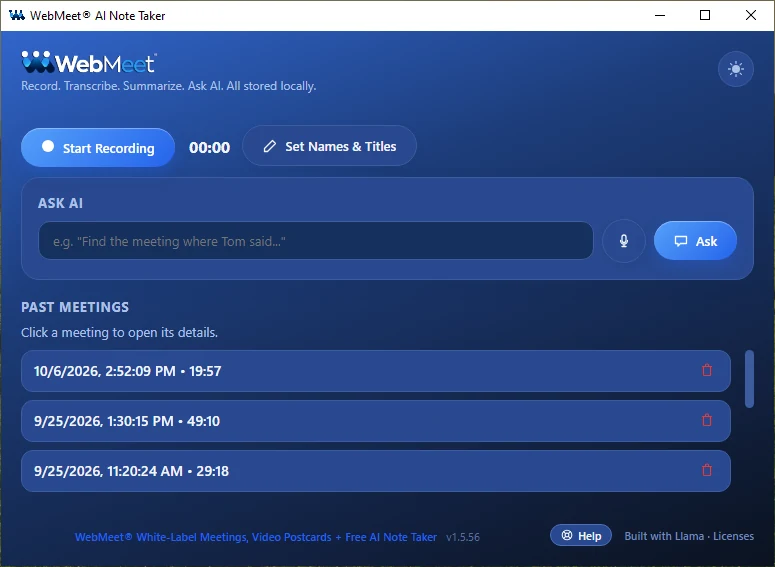
- "What did we decide about the new pricing?"
- "What concerns did the customer raise?"
- "Which meeting did we discuss the AWS migration?"
- "What action items came out of last Tuesday's meeting?"
Unlike a basic transcription tool, the WebMeet free AI note taker helps you search your meeting history and retrieve information using everyday questions.
Ask About One Meeting
Need clarification about the meeting you just finished? Ask a question and get an answer based on that conversation.
Ask Across All Your Meetings
Looking for something discussed weeks or months ago? Instead of digging through old recordings, search your saved meeting history and locate the relevant information.
Imagine having a searchable memory of your meetings—without having to remember every detail yourself.
And because AI processing happens locally, your meeting history stays on your own computer.
Private by Design
A Free AI Note Taker That Keeps Your Conversations Private
Your meetings may include customer information, business strategy, financial details, employee matters, confidential projects or conversations you simply don't want stored on someone else's servers.
Many AI note-taking services rely on cloud processing or storage.
WebMeet® AI Note Taker, however, takes a different approach.
Your recordings, transcripts, AI summaries and meeting history stay on your computer.
Local Processing
Your Conversations, Your Computer, Your Control.
Recording, transcription, summarization and AI-powered questions are processed locally instead of sending your conversations to a cloud-based AI service.
Our free AI note taker also does not upload your meeting recordings or notes to WebMeet's servers for processing or storage.
Key Benefits
- Cloud storage of your meeting history is not required.
- Meeting recordings are not uploaded for AI processing.
- An account is not required to use the app.
- The app has no built-in analytics or activity tracking.
- You control which meetings you keep or delete.
The app downloads its AI models during initial setup, and once installed, its recording and AI processing happen locally.
Just Press Record
No Meeting Bot. No Complicated Integrations. Just Press Record.
You shouldn't have to invite another participant into your meeting just to get good notes.
Because WebMeet records directly from your computer, it captures your microphone and the meeting audio you hear.
As a result, nothing joins your participant list, and there is no meeting bot to configure.
Works With the Meetings You Already Attend
Whether you're joining a WebMeet meeting, Zoom call, Microsoft Teams session, Google Meet, webinar or online training, you can capture audio playing through your computer.
Because our free AI note taker works independently of your meeting software, there's no need to connect your meeting account or install a meeting-platform plugin.
How It Works
Three Simple Steps
Step 1 — Press Record
Open WebMeet AI Note Taker and start recording, then participate in your meeting normally.
Step 2 — Press Stop
When the meeting ends, stop recording. Afterward, WebMeet processes the audio into a transcript, summary, key points and action items on your computer.
Step 3 — Review, Search or Ask AI
Read your notes, listen to the recording or ask AI questions about what was discussed.
Three simple steps, no complicated setup and no subscription.
Download Free for Windows100% Free, No Subscription, No Account Required, No Meeting Bot.
Coming soon: AI Note Taker for macOS.
Names & Titles
Your Names, Your Titles, Your Way.
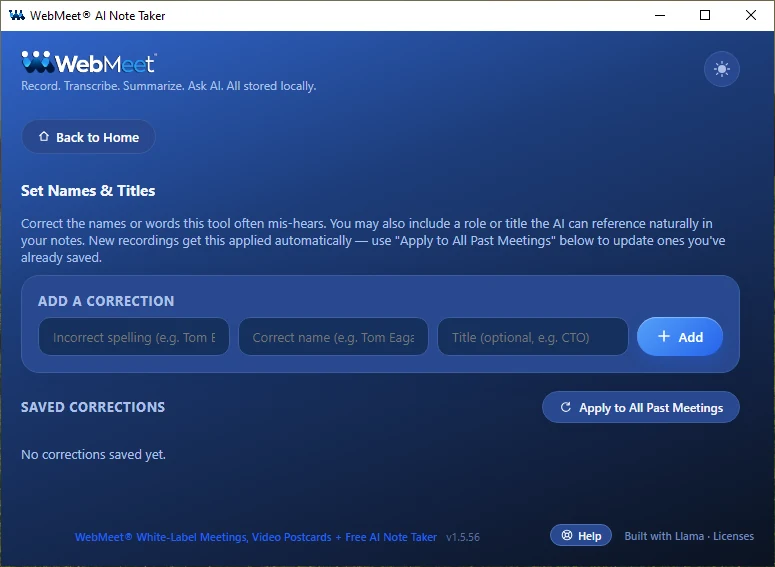
AI transcription is powerful, but it doesn't always recognize names, job titles, company names or specialized terminology correctly.
That's why our free AI note taker includes Set Names & Titles.
Suppose a recording incorrectly transcribes someone's name as "Tom Eager" instead of "Tom Eagar."
Teach WebMeet the correct spelling and associated title, such as "Tom Eagar — CEO."
WebMeet uses your saved corrections to improve consistency in future transcripts and AI notes, and you can also apply corrections to previously saved meetings.
Correct it once, and save yourself the same correction again and again.
And whenever you need to verify an important name, figure, date or commitment, the original transcript and audio recording remain available for review.
Speaker Labels
Know Who Said What With a Free AI Note Taker.
Ever read through a meeting transcript and wondered exactly who said what?
WebMeet® AI Note Taker makes conversations easier to follow by separating your words from those of other participants.
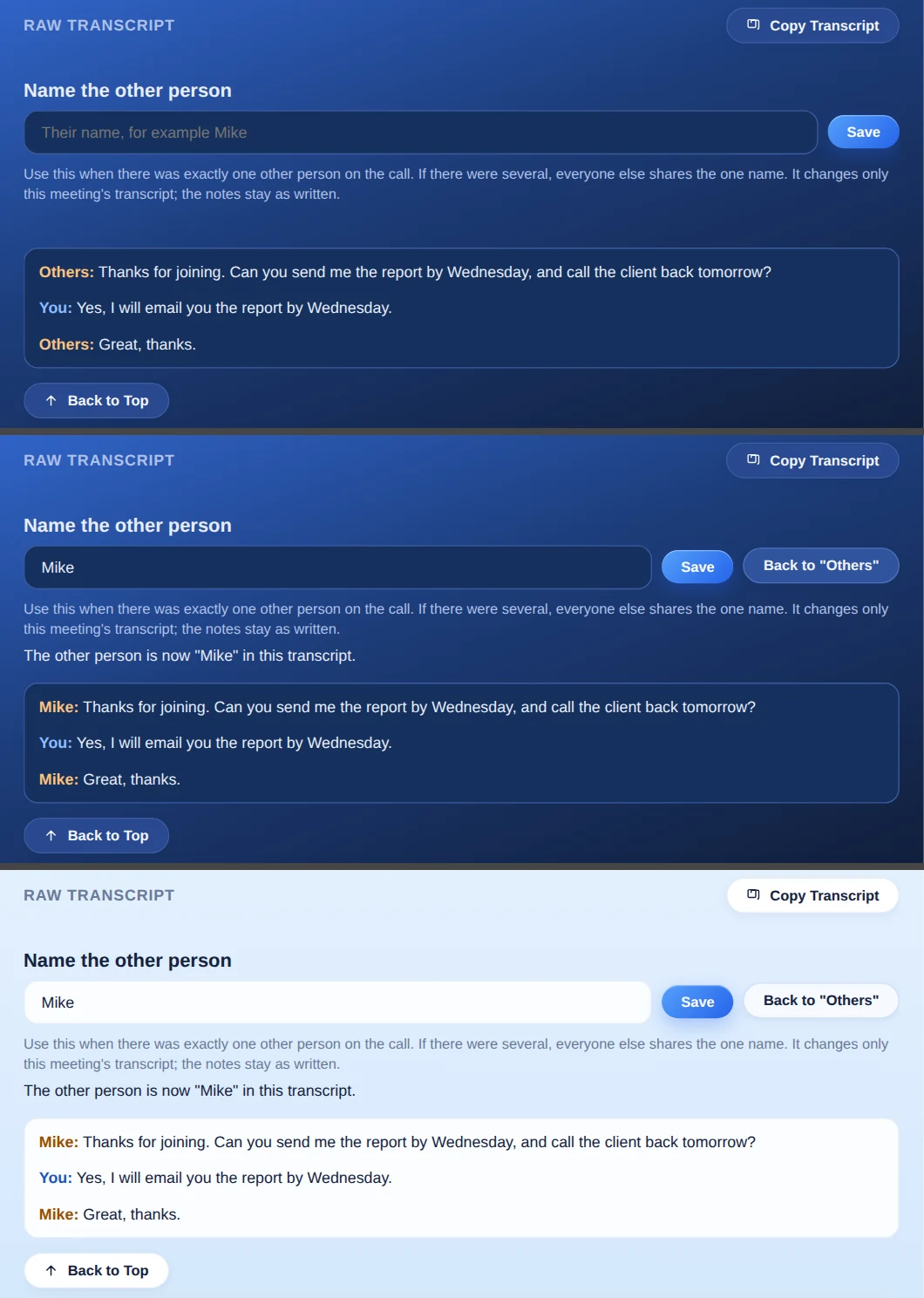
Your transcript identifies your speech as "You" and the other participants as "Others," making it easier to follow the conversation.
For one-on-one meetings, however, you can take it a step further.
Simply enter the other person's name, and WebMeet replaces "Others" with their actual name throughout that meeting's transcript.
For example, change "Others" to "Mike" and instantly see who said what without having to figure it out yourself.
There's no need to manually edit every occurrence, and you can return to the original "Others" label whenever needed.
Clearer transcripts, easier review and better meeting records.
Meeting History
Every Meeting You Hold Becomes a Resource You Can Search.
One meeting summary is helpful, but a searchable history of your meetings can be far more valuable.
Think about all the information exchanged in your everyday conversations:
- Customer requirements and objections.
- Project decisions and upcoming deadlines.
- Promises, commitments and follow-up tasks.
- Ideas shared during brainstorming sessions.
- Training insights and valuable explanations.
- Important details from conversations weeks or months ago.
Most of that information eventually becomes difficult to find—or is forgotten completely.
However, WebMeet transforms those conversations into an organized, searchable collection of information that remains under your control.
And because it's a free AI note taker, you can continue building your meeting history without paying a monthly subscription.
Stop asking, "When did we talk about that?" Start asking WebMeet.
Compare
Why Choose Our Free AI Note Taker?
Why pay a monthly subscription or upload private conversations to the cloud? Instead, WebMeet gives you automatic transcription, AI summaries and intelligent search, with your records kept locally.
(Swipe Left or Right)
| What Matters | WebMeet® AI Note Taker | Typical Cloud Note Takers |
|---|---|---|
| Cost | Free | Often subscription-based |
| AI processing | On your computer | Often on remote servers |
| Meeting recordings | Stored locally | Often uploaded to the cloud |
| Meeting bot | None | Often required |
| User account | Not required | Usually required |
| Meeting limits | No monthly recording quota | Often limited by plan |
| Search past meetings with AI | Included | Varies by provider |
| Control over saved recordings | You control local files | Depends on the service |
Cloud-based tools can be convenient. But for people who value privacy, want control of their recordings or simply prefer not to pay another monthly subscription, WebMeet offers a compelling alternative.
Keep the benefits of AI meeting notes—without giving up control of your conversations.
Coming soon: AI Note Taker for macOS.
Who It's For
A Free AI Note Taker for Professionals, Teams and Everyday Meetings
Whether you attend meetings every day or only occasionally, WebMeet helps you capture the information that matters.
Sales Professionals
Remember customer objections, commitments, pricing discussions and follow-up opportunities, while giving the customer your full attention.
Business Owners & Executives
Revisit strategic decisions, project discussions and important conversations instead of relying entirely on memory.
Consultants, Coaches & Advisors
Keep useful records of client conversations while retaining local control over sensitive information.
Managers & Teams
Capture project updates, decisions, responsibilities and next steps so important details don't get lost.
Trainers & Educators
Turn webinars, lessons and training sessions into transcripts and summaries, so that you can review or reference them.
Anyone Who Attends Meetings
Spend less time writing and searching for notes, and instead spend more time participating in conversations that matter.
If your meetings contain information worth remembering, WebMeet was built for you.

About WebMeet
A Free AI Note Taker Designed by People Who Understand Web Meetings.
WebMeet® AI Note Taker comes from Live Web Seminar, the team behind the WebMeet® meeting platform, with more than 25 years of experience developing web meeting technology.
Because we understand how valuable conversations can be, and why people should have control over the information those conversations produce, we built our free AI note taker around three priorities:
Simplicity, useful meeting intelligence and privacy.
No unnecessary complexity, no meeting bots and no required cloud storage of your conversations.
In short, it is a practical tool that helps you get more value from every meeting.
FAQ
Frequently Asked Questions
Is WebMeet really a free AI note taker?
Yes, WebMeet AI Note Taker is available at no cost. There is also no required subscription, and there is no monthly meeting-recording quota.
What makes WebMeet different from other AI note takers?
WebMeet combines free meeting recording, transcription, AI summaries, searchable meeting history and local AI processing, and you don't need an account or a bot joining your meetings.
Can I use this free AI note taker with Zoom, Teams and Google Meet?
Yes, WebMeet captures audio from your microphone and computer, so it can record meetings and other audio you can hear on your computer. It also does not require a special meeting-platform integration.
Will other meeting participants see a recording bot?
No, WebMeet does not add a bot to your meeting or appear in the participant list. However, you remain responsible for informing participants and obtaining any recording consent required by law or company policy.
Is my meeting information really private?
WebMeet processes and stores your meeting audio, transcripts and AI-generated notes locally on your computer. The app initially downloads the AI models it needs, but your meeting content is not uploaded for AI processing.
Can I search for something discussed in a previous meeting?
Yes, you can ask AI about an individual meeting or search across your saved meeting history to find conversations, decisions and other information.
Can I correct names and titles in the transcripts?
Yes, Set Names & Titles lets you save name and title corrections for improved consistency and apply them to previously saved meetings.
Can I listen to my recordings again?
Yes, your audio recordings are retained locally so that you can listen to them again and verify important details.
Does this free AI note taker work on Windows and Mac?
WebMeet AI Note Taker is currently available for Windows 10 and Windows 11 (64-bit), while Mac and mobile versions are coming soon.
Do I need an internet connection?
An internet connection is required to download the app and its AI models, but once the models are installed, recording and AI processing are performed locally. Your meeting platform, however, may still require an internet connection.
How long does it take to generate my meeting notes?
Processing time depends on the length of your recording and your computer's performance. Also, the app generates the transcript and notes after recording stops.
How accurate are the AI transcripts and summaries?
AI-generated notes are helpful but can contain errors. Always verify important names, numbers, dates and commitments against the original transcript or audio before relying on them.
Download Your Free AI Note Taker. Be Fully Present in Your Next Meeting.
Stop Taking Notes. Start Paying Attention.
Get started with WebMeet®, the free AI note taker built for people who want better meeting notes without subscriptions, cloud uploads or complicated integrations.
Free, No Subscription, No Account, No Meeting Bot.
Coming soon: AI Note Taker for macOS.
Please comply with applicable recording-consent laws and company policies. Also, AI-generated content may contain inaccuracies, so review important information before acting on it.